Monday, June 25, 2012

Photo Editor by Aviary


Photo Editor by Aviary for iOS. 
Compatibility: iPhone 3GS, iPhone 4, iPhone 4S, iPod touch 3rd gen, iPod touch 4th gen, and iPad.  Requires iOS 5.0 or later. Cost: Free, in app purchases for .99¢  http://www.aviary.com/


Aviary has produced and iOS app called Photo Editor.  Aviary is the company that was recently chosen by Flickr as the photo editor of choice replacing PikNik. Aviary offers a SDK for Web, iOS, Android and Windows Phone 7. I am reviewing their app on the iOS. 
When the app opens it links up to your photo iOS device camera roll.  You can then scroll left or right through all the photos in your camera roll.  There are three buttons along the bottom:  “Camera”, “Edit this Photo” and “Gallery”
Tapping on the "Camera" button takes you to your devices' camera and lets you take a picture.  When you've captured the image, clicking on the "use" button switches you into the Aviary Photo Editor. 
Remember when first opening the app, it links you to your camera roll. Tapping on the "Edit this Photo" button switches you to the photo editor portion of the app.


Tapping on the "Gallery" button takes you to the camera roll on your iOS device. This way you can select a photo from your camera roll that contains all of the pictures on your device or you can select a photo from one of the galleries you have set up on your device. When you select a photo from one of the galleries the app opens the photo in the Photo Editor. 

There are fourteen different editing choices available for your photo. Enhance, Effects, Stickers, Orientation, Crop, Brightness, Contrast, Saturation, Sharpness, Draw, Text, Redeye, Whiten and Blemish.  These are pretty self explanatory.  I used all of them on several different photos.  The edits made to the photos happened quickly without delay.  Once you are satisfied with a change, choose the "apply" button and the app takes you back to the main photo editor page. You can continue making changes to your photo, but none of the changes you make are permanent until you tap "done".  When you tap done, the app makes a copy of the photo with your edits and saves it in your camera roll.  This way, you still have the original photo and the photo that you edited.  
Here's the picture above with some edits made. 
With Text, Draw and Stickers edits


The edit tools have a very easy to use system to make changes to your photos. When editing a picture using the "Brightness" edit feature as shown here, the picture is displayed and there is a wheel control at the bottom of the screen that you can turn to adjust brightness up or down.  There is a small gauge right above the wheel that shows how far you have adjusted the brightness darker or lighter.
The "Contrast" and "Saturation" adjustments have the same wheel adjusting system. Some of the editing functions also give you the ability to zoom in on the portion of the picture you wish to change.
Overall, I found the editing functions very easy to understand and use.
There are in-app purchases available that enable you to add effects to pictures. When you tap on the "Effects" edit button, you are given a choice of "Original", "Grunge", "Nostalgia", and "ViewFinder".  Each additional effect costs .99¢.  I bought the Nostalgia effects pack, since this was the most popular in-app purchase. The effects available in the Nostalgia pack are: "Siesta", "Cherry", "Fixie", "Firefly", "Malibu" and "Vogue".  Here is a picture of Rocky with the "Siesta" effect applied.

As you can see, the effect rounded the corners and gave it that dreamy, brownish orange color.  It looks nice and the app made the change in just a few seconds. 
In the options menu, you can do some customization.  You are allowed the change the order of the tools in the photo editing section.  You can also set the maximum size of a photo you are saving to your camera roll; 3,  5 and 12 megapixels.
I did notice a couple of things missing from the app, which seem to be ubiquitous in all newer photo apps.  There is no choice to share on social sites and no choice to share the picture via email. 
This app is quick and easy to use. I would recommend anyone who loves taking pictures with their mobile device, iOS or otherwise, to get this free app. 

Wednesday, June 20, 2012

Stop that criminal behavior, Mr. Photographer!

There as been a disturbing trend brought to us by law enforcement ever since the 9/11 terrorist attack on the United States. Photographers, professional and amateur alike, are being treated like they are planning the next terrorist attach on our country and need to be stopped.


This, of course, is absurd.


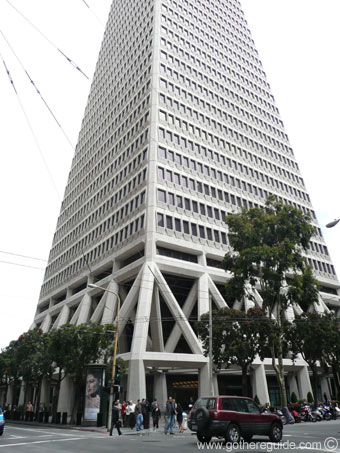
There may be a case for some security on particular high profile buildings like the Empire State Building or the Transamerica Pyramid, but stopping people from taking photographs of these buildings is in no way going to stop a terrorist attach on the building. 


As we all know, everything is available on the web. You want a picture of the Transamerica Pyramid?  Ok, let's go to Google images and get one: 

To find the above photo on Google my search took .26 seconds and returned 122,000 images.  No person or group who is planning any type of terrorist attack on a landmark or building would take the chance being caught near such a place when any photo they would need is available quickly and easily on the web.

The truth of the matter is that no one can stop you from taking a photo of a building or anything for that matter as long as you are taking the photo from an area that is accessible to the public.  Now, there are rules against standing on private property and taking photos.  That is definitely breaking the law and you can be asked to stop taking pictures. 

The impedance for me to write this post was from a story I read about a photographer who was asked to stop taking pictures of the Miami Herald Building which is a landmark building in Miami, FL.  This story can be found here: http://goo.gl/kvC82

I also found an article by Glenn Harlan Reynolds written for Popular Mechanics magazine that contains a lot of relevant information regarding photography do's and don't's. That article can be found here: http://goo.gl/jPjHU

Photography is not a crime and no photographer should be treated as such.


Monday, June 18, 2012

Flash! The dreaded "M" - manual mode

I had the pleasure of attending a workshop presented by the Northern California Professional Photographers (ncpponline.org) on Thursday, June 14th. The subject of the workshop was "Amazing Light - Anytime, Anywhere" with Scott Robert Lim (www.scottrobertgallery.com). 

Mr. Lim gave a really informative presentation on the use of flash in any setting. He covered the "Inverse Square Law" and how it is used to calculate light fall-off and why, when you move a light source closer to a subject, the light is softer. Since I've been studying photography and lighting for some time now, I am familiar with this concept, but when you have the opportunity to see someone do a live demonstration your understanding becomes much deeper.

Mr. Lim is a proponent of using reflective and white umbrellas for any shoot needing a diffused flash and the importance of learning to use your flash in manual mode. As Mr. Lim explained, if a shot using flash is blown out and you are using the flash in the "auto" mode then no matter what adjustments you make to the camera's ISO, shutter speed or aperture, the flash will compensate and you will produce the same ill lit image. Having full control over your flash by learning how to use it in manual mode is the only way to produce quality images and to ensure you will be able to see your vision to it's fruition.

I recently had an experience that supports what Mr. Lim preaches. I am in the process of learning how to take studio portraits. I was using my 580EXII Speedlight in the TTL mode to light my subject and I was not happy with the results. I moved the Speedlight closer, not happy. I moved the Speedlight farther away, not happy. I shot through an umbrella, not happy. I shot into an umbrella, not happy. No matter what I did, the portrait I was trying to take did not have the right exposure. Finally, with no where else to go, I put the flash in the manual mode and opened the instruction book. I learned to changed the power and zoom settings manually. Lo and behold, I finally was able to get an acceptable portrait.

Understanding the manual mode power and zoom controls has really made a difference in my photos.

And then a surprise... My father-in-law is a big proponent of my photography work. He is a pretty good photographer in his own right. Well, he was at a garage sale and found a almost brand-new reflective studio lighting kit for me. The kit had barely been used. We set it up this weekend and it works great! He probably paid $5 for it. The kit is around 30 years old and the workmanship and stability shows it. This kit is solid! Everything is made of metal, no plastic parts here. So thank you Bob for the Fathers Day surprise!

I appreciate any comments below.

Wednesday, June 13, 2012

Stop! Listen! and Learn!

My interest in photography was peaked several years ago. I had started listening to The Tech Guy radio show hosted by Leo Laporte. I soon figured out that Mr. Laporte hosted many other technology shows. I started listening to these shows and often his guests would be photographers, which is what got me interested in photography. In this posting I'll write a short synopsis of some of my early and current photography and technology influences and why you should listen to these people as well!


Scott Bourne (www.scottbourne.com, @scottbourne on Twitter)

Mr. Bourne was a major influence on my decision to make photography a big part of my life. Mr. Bourne is a world famous photographer that takes some of the world's best photographs of animals, particularly birds, in their natural habitat.
Mr. Bourne has a podcast called Photofocus. When I started listening to the podcast, the format of the show was Q&A. Photographers (amateur, semi-pro and pro) would email in questions that Mr. Bourne and "Canon Explorer of Light" Rick Sammon would try their best to answer. You learn a lot listening to the answers. You would be surprised how many people out there have the same exact questions that you have!
The format of the podcast has changed I'm sad to say.  The show is now hosted by Richard Harrington and Mr. Bourne is a co-host once in a while. They do very few Q&A sessions now.  The show is still good, but it was better with the old format.
The best part of the old Q&A format was the guest co-hosts.  Mr. Bourne would have guest co-hosts every week.  The list consisted of such great photographers as Tamara Lackey, Bambi Cantrell and Kevin Kubota.  What made this part special was that each guest host would have a different answer or point of view on a particular subject than Mr. Bourne did.  This way you got both sides of the "story".  Having two answers to the same question allows you to take all the information in and make your own decision. 
Mr. Bourne is still active on many podcasts and his blog. I recommend following Mr. Bourne on Twitter and to visit his site regularly for great information on photography and to view some of his great images.  He has coined one of my favorite photography sayings: "Don't just take pictures, make pictures."

Rick Sammon (www.ricksammon.info, @ricksammon on Twitter)

I was first introduced to Mr. Sammon while listening to the Photofocus podcast referred to in the above paragraph. Mr. Sammon offered a lot of good advice on how to "see the light" when taking pictures. I found out a little later that Mr. Sammon is a Canon "Explorer of Light".  The "Explorer of Light" designation from Canon means that Mr. Sammon was chosen to join an elite group of 60 photographers and cinematographers who were selected to share their knowledge and expertise. Mr. Sammon is often referred to as one of the "Godfathers" of photography.  
Mr. Sammon, along with Juan Pons, host the Digital Photo Experience (DPE) podcast.  Mr. Sammon and Mr. Pons talk about the latest gear, software and news in the photography world.  They usually have a very insightful interview with a photography industry leader. The last part of the show is always spent on answering photography questions sent in by show listeners.
Listening to Mr. Sammon's advice will surely make you a better photographer. 

Leo Laporte (www.twit.tv, leoville.com, @leolaporte on Twitter)

Leo Laporte is not a photographer, but he is a tech guru and worth listening to just to get the latest tips, tricks and news in cutting edge technology. Mr. Laporte has a long pedigree in the technology industry. He hosted one of the first technology help shows, TechTV.  
I originally got "hooked" on Mr. Laporte while listening to his "Tech Guy" radio show. This is a syndicated radio show where people with computer problems call in and ask Mr. Laporte how to fix them. It is fascinating to hear people call in and ask for help with some of the same problems I was having. Without Mr. Laporte's help I would have never had the guts to upgrade the ram on my PC years ago.  
Mr. Laporte also runs the TWIT network which is a growing collection of daily and weekly shows on various subjects; technology, law, humor, just to name a few. The technology show that he hosts (This Week in Tech or TWIT) is a panel show with several guests. Mr. Laporte and his guests discuss the technology news of the week. Often times, these guests can be photographers, so it's always interesting to hear their take on the technology news of the week. Mr. Laporte, along with photographer Catherine Hall (www.catherinehall.net), host a weekly photography show called "TWIT Photo". I highly recommend any photographer at any skill level listen to this show. The show is always very helpful and informative. There is the added bomus of watching the show as well because Mr. Laporte streams his shows live. Watching the show is helpful when Ms. Hall does a photography demo. 
I highly recommend watching live or listening to any of the TWIT Network shows to become a more informed photographer and techie. 


Rosh Sillars (www.roshsillars.com)

Mr. Sillars is a recent addition to my podcast listening habit. I heard Mr. Sillars when he was a guest on the Photofocus podcast. Mr. Sillars is a veteran photographer who specializes in photojournalism of people, food and interiors. 

Mr. Sillars is now more of a social media maven, offering great free help on getting vistors to your blog or photo site.  He posts new podcasts and updates his blog quite often, sometimes several times in one week. His help is invaluable. If you care about building your brand, getting visitors to your site and more business, photography or otherwise, you would be wise to subscribe to Mr. Sillars podcast found under Detroit Creative Labs in iTunes.


Frederick Van Johnson (frederickvan.com, mediabytes.com, @frederickvan on twitter)

Mr. Van Johnson is a professional photographer and social media expert.  His photography business and knack for marketing has led him to start a marketing company for creative professionals called MediaBytes.

Mr. Van Johnson also hosts "This Week in Photography" or "TWIP", not to be confused with Mr. Laporte's "TWIT Photo" podcast. The podcast is always hosted by Mr. Van Johnson and several fellow photographers. They discuss the news of the day, play a pre-taped interview with a famous photographer and then do a Q&A session answering questions sent in by listeners of the show.

Mr. Van Johnson has an excellent personality for hosting the show.  He's very easy going and makes sure each co-host on the show is allowed to give their own opinion on the particular news story they are reviewing.  Of course they also review any new release of photography software or the latest camera that's been introduced on the market.

I recommend listening to the TWIP podcast to stay current on the latest news and current trends in photography.

These are, in my opinion some of the most important people and trend setters in the photography, technology and social media business. They not only have great shows but they are all great teachers who love sharing their knowledge with all of us.

Tuesday, June 5, 2012

What is a photograph?

I've been thinking about what to write for my next blog posting. I've stopped and started on several different topics. Needless to say, I was having a hard time.  Then I came across the photos of Adam Schallau. 

Adam Schallau is a photographer who is "inspired by the landscape, culture, and people of the American West". I just happened to run across his website while on the Photoshelter website. They had his website up as a example of the websites that they can offer to a photographer and I just happened to click on it.

His photographs are truly inspiring. The pictures on his site made me stop and think, "What is a photograph?"

To me, a photograph should be a image that makes you feel something. It should bring out an emotional response in the viewer.  Does looking at the picture make you sad? happy? relaxed? Does it inspire you to work harder on your own photography skills in order to push yourself to do better work? 

When I came across Adam's work I was amazed at the feelings that it brought out of me.  The huge landscapes, the beautiful colors and the shear grandness of the pictures.  Knowing there are places in America that are still untouched by human hands. My feelings were all over the place.

That's when I decided what a photograph is to me. 

View Adam's work at: http://adamschallau.com/adam-schallau/

Friday, June 1, 2012

New App Review: FreezePaint!


  • App Name: FreezePaint www.freezepaintapp.com
  • Developer: Ron Brinkmann
  • System and gear requirements: Any iPhone or iPod touch with a camera running iOS 4.2 or newer. Designed for iPhone, compatible with iPad.
  • Cost: Introductory .99¢, then $2.99
Being a budding photographer, I am always listening to and watching podcasts on the subject. One of my favorite shows is "This Week in Photo" or TWIP. TWIP is hosted by Frederick Van Johnson. The show is always interesting and informative. Along with Frederick, there are a few recurring guests on the show, including Ron Brinkmann. At the end of the show, each guest shares a "pick of the week" with the listeners.

At the end of one of the recent shows, Mr. Brinkmann shared that he had been working on a new iOS app that was recently released called FreezePaint. FreezePaint promises a new kind of photography and it delivers!

When you first open the app, the initial screen welcomes you to FreezePaint and gives brief instruction on how to use the app and save/share pictures. Each button along the bottom edge of screen in labeled. 

The initial screen is closed with a tap to the screen. The i-device camera is now active and you are ready to start using the app. The Welcome screen can easily be brought back up by tapping the question mark in the bottom row of icons.

There are two ways to use the app. The first is to frame the picture you wish to manipulate and tap the Freeze or Clear All button and choose Freeze All. The next step is to use your finger and "erase" a portion of the picture you wish to replace with another image. The best way to describe what happens is that a little "window" appears in your current image where you have just erased. Using the i-device camera, find your next image by looking through the little window and then choose Freeze again by tapping on the Freeze button and choosing Freeze All.  In the example below I took a picture of my Airedale calendar (Yes, I have an Airedale Terrier named Rocky and I think he's the greatest), erased the head of one of the Airedales in the photo and replaced it with Rocky's photo.
Rocky is the one on the right
In the next example, I froze an image of an old Coca-Cola mirror, erased Coca-Cola and replaced it with another product, Swiffer. 


The other way to use FreezePaint is basically the opposite of the above manner.  Frame the image you want to use and draw on the portion you want to save.  Once you draw on the portion you want to save, lift your finger and the app saves that portion of the image.  Then frame the portion you just saved over another subject and tap the Freeze or Clear All button and choose Freeze All.  You now have a new image.

You can erase or save portions of images multiple times for the same image. I believe you are only limited by the size of the i-device screen. I was able to copy 40 different portions of an image and then stopped.

I know what you're thinking, "What can I do with these cool new images I'm making?" Well, if you are not happy with the image, tap the Freeze or Clear All button and choose, you guessed it, Clear All. To save an image to your i-device camera roll, tap the save/share icon. The app automatically saves the image.  

All of the "required" social features are built into the app. Once you've saved a image to the camera roll, you can tap the save/share icon to share the image on Twitter, Facebook, Flickr or email.  

The last icon is the configure icon. Tapping on this icon brings up the configure menu to set the flash either Auto, On or Off. You can also change the brush size with a slider in this menu. 

I think there are lot of interesting images that can be made with this app. It's also a lot of fun. I've changed lips and ears of portraits that we have hanging on the walls in our house and it's pretty funny.  But I'm sure there are other uses for the apps that I have yet to explore. You are only limited by your imagination. There are plenty of neat images on the FreezePaint website for you to explore. The app is currently .99¢ in the Apple App Store for a limited time before the price increases to $2.99. I suggest that you get the app before the price increase. It's a lot of fun and will give you hours of enjoyment.