Tuesday, August 7, 2012

The Mode is Manual for a Reason!

I have been listening to quite a few photography podcasts lately that have talked about shooting in "manual" mode.  This is the mode on your dslr where you choose your own aperture, shutter speed and ISO to create your image.

I've been taking pictures for a while, but I've mainly stuck to Aperture priority. I'll also shoot Shutter priority when the occasion calls for this mode. But never had I shot manual mode. 


Let's give manual mode a try

I had decided to try the manual mode because I am now trying my hand at portrait photography. When taking portrait shots, try as I might, I was having a lot of trouble getting a good image. The camera is always trying to expose for 18% gray, so the camera was always using a long shutter speed to make up for how dark my subject was and has a result, the images were out of focus and blurry because of the long shutter speed. 
So, I flipped my camera and my focus to manual mode.  After setting my aperture, shutter speed and ISO I was ready to go. I pushed half way down on the shutter release and to my surprise, the +/- exposure indicator went all the way down to -2 and I was the proud owner of a almost black picture.  I was at a loss for what was happening. Did I change a setting in my camera to make the camera switch to a -2 exposure every time I tried to take a picture in manual mode?  

After trying for several shots to get the manual mode to work "properly" and going through all the camera settings, I gave up. It wasn't working right and I was tired of trying to make manual mode work for me.  But, as always, I couldn't let it go. I had to figure out what was "wrong" with my camera so I started searching online for an answer. 


Problem solved! 

Now, many of you reading this already know the answer to my problem, but let's not spoil the surprise for everyone else.  

I  googled "canon manual mode exposure problem". I clicked on the first link that Google had provided and there, lo and behold, was my answer.  Manual mode means everything is manual and you can't set the exposure using the exposure adjustment. Exposure is set through the combination of aperture, shutter speed and ISO. Something that I'm sure anyone who has ever shot film in the past knows like the back of their hand.  The camera, in moving the exposure indicator all the way to -2 was trying to tell me, "hey, dummy, your aperture, shutter and ISO settings are going to produce a really black picture and you need to correct this".  

So, I had my answer. I've always refused to take any formal photography classes or training and this is what happens. I'm zipping along thinking I know photography and yet the most basic beginner rule is stopping my portrait photography. 

I guess it's time to get out that Adult Course Catalog and look for some classes. 


triolophoto.com
facebook.com/triolophoto
twitter.com/triolophoto
My blog is now part of the Alltop news and blog aggregation site. It's the best way to stay up to date on all your favorite topics. Just go to alltop.com, set up your account and follow your favorite topics. It's very easy. If you have a blog that you would like included in the Alltop listings, go to http://alltop.com/submission/ to submit your link for review.


Tuesday, July 31, 2012

What works for one person may not work for another

Setting up a studio
I've been trying my hand at taking portraits.  My wife, who is a saint, let me set up a small studio in our living room.  Quite frankly we don't use the living room very much, if at all, so transforming it to a small studio was a snap. Only one coffee table had to find a new "home". 

So I set up a couple of back drops, one black and one white.  I have a constant lighting rig as well as a Canon 580ex flash. I also have various tripods, umbrellas and other light modifiers. After listening to several podcasts and reading books on portrait photography, I thought I was ready to try some portraits.  

First, I tested on myself
The first shots I took were of myself.  I used my remote to activate the shutter.  After quite a few attempts, I finally got the constant lighting just right and took an acceptable portrait. It's the photo that is attached to my Google profile.  

The failed test!
Then came a test.  My daughter is starting her own makeup business, and I needed to take some glamour shots of my wife and my daughter that could be used on her website to advertise her business.  Obviously the most important part is getting a good image of their makeup to show off my daughter's skill.  I set my wife up with the constant light and every shot was blown out like this one. You could see some of the makeup, but the shots were not acceptable. 

I was shooting Aperture priority mode.  I couldn't get the right exposure.  So, I thought to myself, let's try manual mode.  This way I can set the shutter speed, aperture and ISO on my own to get a good picture.  

So, I set the aperture and shutter speed, but every time I pushed half way on the actuator, the exposure indicator on the lcd went down to -2 and what resulted was a black picture.  I, erroneously,  thought that there was a camera setting I had messed with which was making the exposure go all the way to black.  (More on this in my next post).  I still couldn't get the shot. 

Success!
Finally, I switched over to just using my flash.  I set the flash on manual mode at 1/16th power and a shutter speed of 1/200 and did some test shots.  I was finally happy with my photos.  Here's some examples of the shots that my daughter will be using in her makeup portfolio. 

As you can see, the final results are much better.  They highlight the makeup that has been applied.  The soft glow really makes the pictures feel warm and inviting.


I was sure that setting up these shots using constant lighting was going to work just fine because it had worked so well for my portrait. But in the end, I had to adjust what I thought I "knew" for another method that worked better for these images.


triolophoto.com
facebook.com/triolophoto
twitter.com/triolophoto
My blog is now part of the Alltop news and blog aggregation site. It's the best way to stay up to date on all your favorite topics. Just go to alltop.com, set up your account and follow your favorite topics. It's very easy. If you have a blog that you would like included in the Alltop listings, go to http://alltop.com/submission/ to submit your link for review.

Monday, July 23, 2012

The Delta Digital Camera Club

On Saturday, July 21st I had the opportunity to attend my first camera club meeting. 
It was very fun and informative. The Delta Digital Camera Club was formed for photographers who live in our area which is the area in Northern California collectively known as "The Delta".  It's the easternmost part of Contra Costa County.  The problem with living in an out-of-the-way area is that all the meet ups and camera clubs are a 30 to 40 minute drive for us people that live in towns like Brentwood, Oakley and Discovery Bay. Now that I have one so close, it will be easier to belong to a club.


Mr. Wayne Francis of Brentwood formed the club using a website called "Meetup" (www.meetup.com).  Meetup is a site that caters to basically any group of people who have the desire to enjoy an activity with a group of like minded individuals. If you have a hobby or interest, check meetup for others who enjoy the same activities. If there's no meetup already in place, then start one!  


Many different types of people with a variety of skill level 

To open the meeting, we went around the table and introduced ourselves. Those of us attending the meeting were from many different walks of life. There was a retired marketing executive, a school web administrator, two  professional photographers, a financial professional and so on. The skill level went from beginner to experienced pro. In fact, one of the attendees only uses her iPhone as her main camera. We come from all walks of life. But we all have one thing in common, the love of photography. 


Many different ideas on where to take pictures

We also went around the table and gave our ideas about where to go and take pictures. Of course most of the suggestions I'm sure you can guess: Yosemite, Yellowstone, Grand Canyon...etc. 
What is really eye-opening are the places locals suggest to go and take picture and I've never heard of these places! 

Where have I been? Not in a camera club that can give such great ideas, that's for sure. 


So, maybe you don't need help with your photography. Maybe you have plenty of friends. Maybe you're thinking you don't need to join a camera club. I'm thinking it's a good idea to join one, because now I have eighteen new friends to meet with, share ideas and take pictures.


My blog is now part of the Alltop news and blog aggregation site. It's the best way to stay up to date on all your favorite topics. Just go to alltop.com, set up your account and follow your favorite topics. It's very easy. If you have a blog that you would like included in the Alltop listings, go to http://alltop.com/submission/ to submit your link for review.

Saturday, July 14, 2012

Apple's Podcast App is Terrible

I'm done with the Apple Podcast app for iOS. It has been deleted from my iOS devices. 

Love at first site


When I first saw the Podcast application in the app store after the most recent Apple World Wide Developer Conference, I was pretty excited. I am a huge podcast fan. I listen to podcasts all the time. Some for learning photography, some for keeping up to date on the latest technology, some just for fun. So what could be better than an application made by Apple for the specific purpose of listening to my favorite shows? I thought I would I loved it. 


  • The tiled interface looks really slick.
  • The "tape to tape" interface is functional and fun. 
  • The subscription and sorting options really help keep your listened to and not listened to shows in some kind of order. 
 I thought it was all so cool. So slick. So Apple. But it isn't. 


Where do broken hearts go?

After struggling for at least two weeks with the app I have now deleted the app. I couldn't stand it any longer.

  • It's buggy, annoying and crashes all the time.
  • The app hangs anytime you start it.
  • Selecting a podcast and trying to download it makes me want to pull my hair out and I don't have a lot left to pull.
I am now happy using the old Music app to play my podcasts because it actually works.

Does the Podcast app work with iTunes?


The biggest part of my frustration is trying to figure out how the Podcast app integrates with iTunes. Since the new Podcast app has a choice to subscribe to the podcasts you listen to, do I still need to subscribe to my podcasts in iTunes? Do I still need to add and remove podcasts when I update my iPhone? I searched on the Apple website and could find no information on how the app integrates with iTunes. I went through all my podcasts in the iTunes app and unsubscribed to them since I was now subscribed in the Podcast app. But then all my podcasts showed up in the Podcast app with old shows listed that had already been heard.


I have no idea what's going on with the Podcast app, but I'm not using it any longer. And part of this is Apple's fault. Most everything that Apple does is great, from computers to the app store to iTunes. Their products work well and because they work well, it's a huge letdown when something they produce doesn't work properly. 


Until Apple releases an update to the app and it's working properly, I recommend staying away from the app for the time being. 


____________________________________________________


My blog is now part of the Alltop news and blog aggregation site. It's the best way to stay up to date on all your favorite topics.  Just go to alltop.com, set up your account and follow your favorite topics. It's very easy. 
If you have a blog that you would like included in the Alltop listings, go to http://alltop.com/submission/ to submit your link for review.

Sunday, July 8, 2012

Change your perspective and break the "rules"!

I went out to the front of my house on the 4th of July intent on taking a picture of the American flag that I could post on Facebook and Twitter. 


I stood and took pictures of the flag flapping in the wind from one side 


and then moved to the other side.


 All the pictures were just "blah". I was looking for inspiration. 


Then I walked under the flag, looked up and noticed the sun. The sun was high in the sky. As all photographers know, taking pictures with the sun high up in the sky is not the optimal lighting. But what I did notice was the sun shining right through the blue field on the flag making an interesting pattern. I found my inspiration. 


So, I laid down on the hot cement and positioned myself under the flag.  Of course I didn't lay down in the perfect spot, so I had to slide around a little to get in the perfect position to nail the shot.  I waited for the wind to start blowing again and when the flag was flapping around in the air, and more importantly, in front of the sun, I took my shots. Yes, that's right, I shot directly into the sun.  


When the blue field of the flag was between me and the sun I was able to get some pretty good pictures. This is my best one and after a little cropping,  I posted to Facebook and Twitter to wish everyone a Happy 4th of July.


I've heard the rules of photography from many professional photographers. I've also heard the same pros say "Now that you know the rules, break them", which is what I ended up doing.  


Move around, change your perspective, look up and look down because you never know where you will find your inspiration. 


I appreciate any comments.
Contact: triolophoto@gmail.com
FB: www.facebook.com/triolophoto
Twitter: triolophoto


Sunday, July 1, 2012

eyeCLICK Kickstarter Project


eyeCLICK for iPhone. 

eyeCLICK is a product from David Wu. Mr. Wu, when he's not designing new, cool gadgets for the iPhone, is also the CEO of Madcow International Group. This product is not available for purchase as of yet.  Mr. Wu is pulling together funding for the project through Kickstarter. For those of you not familiar with Kickstarter, it's a way for new and creative projects to receive funding for their project via the web. Go to www.kickstarter.com for more information on how Kickstarter works.
The eyeCLICK for the iPhone solves a few of problems that exist when using the front facing camera on the iPhone. The eyeCLICK is a unit that attaches to the iPhone to give it more functionality than currently available.


Problem 1: The front facing camera is only VGA quality, where the rear camera is 720p, which is HD quality.  
The eyeCLICK uses a special set of mirrors and lenses that redirects the rear camera to the front.  This will allow you to take HD quality images of yourself and have an HD image when using Facetime or any other video communication app. You can still line up the shot using the iPhone screen. 


Problem 2: When taking a picture with the front facing camera, you always have to hold it at arms length making it practically impossible to get more than one person in the shot. 
The eyeCLICK also makes it possible to actuate the camera shutter remotely so you don't have to hold the camera at arms length to take a picture. You will now be able to set the iPhone down and frame your picture in the iPhone screen.  This also allows you to have more than just one or two people in the photo because you can move your group toward or away from the phone and frame it properly before you remotely activate the shutter and take your shot. And, because you are activating the shutter remotely, you no longer have to use the timer to take a picture.


Problem 3: Taking a picture with the back facing camera always means you have to have a designated photographer who won't be in the picture. 
Now, because of the remote trigger for the iPhone, no one needs to be left out of the picture any longer.


Remember, this product is still in development stages and Mr. Wu needs funding of $20,000 USD to build the product.  As of the writing of this post he has received a total of $2,436. For more information on the product or to help Mr. Wu fund his product, go to  http://www.kickstarter.com/projects/656400238/eyeclick-iphone-4-4s-camera-remote-0

Monday, June 25, 2012

Photo Editor by Aviary


Photo Editor by Aviary for iOS. 
Compatibility: iPhone 3GS, iPhone 4, iPhone 4S, iPod touch 3rd gen, iPod touch 4th gen, and iPad.  Requires iOS 5.0 or later. Cost: Free, in app purchases for .99¢  http://www.aviary.com/


Aviary has produced and iOS app called Photo Editor.  Aviary is the company that was recently chosen by Flickr as the photo editor of choice replacing PikNik. Aviary offers a SDK for Web, iOS, Android and Windows Phone 7. I am reviewing their app on the iOS. 
When the app opens it links up to your photo iOS device camera roll.  You can then scroll left or right through all the photos in your camera roll.  There are three buttons along the bottom:  “Camera”, “Edit this Photo” and “Gallery”
Tapping on the "Camera" button takes you to your devices' camera and lets you take a picture.  When you've captured the image, clicking on the "use" button switches you into the Aviary Photo Editor. 
Remember when first opening the app, it links you to your camera roll. Tapping on the "Edit this Photo" button switches you to the photo editor portion of the app.


Tapping on the "Gallery" button takes you to the camera roll on your iOS device. This way you can select a photo from your camera roll that contains all of the pictures on your device or you can select a photo from one of the galleries you have set up on your device. When you select a photo from one of the galleries the app opens the photo in the Photo Editor. 

There are fourteen different editing choices available for your photo. Enhance, Effects, Stickers, Orientation, Crop, Brightness, Contrast, Saturation, Sharpness, Draw, Text, Redeye, Whiten and Blemish.  These are pretty self explanatory.  I used all of them on several different photos.  The edits made to the photos happened quickly without delay.  Once you are satisfied with a change, choose the "apply" button and the app takes you back to the main photo editor page. You can continue making changes to your photo, but none of the changes you make are permanent until you tap "done".  When you tap done, the app makes a copy of the photo with your edits and saves it in your camera roll.  This way, you still have the original photo and the photo that you edited.  
Here's the picture above with some edits made. 
With Text, Draw and Stickers edits


The edit tools have a very easy to use system to make changes to your photos. When editing a picture using the "Brightness" edit feature as shown here, the picture is displayed and there is a wheel control at the bottom of the screen that you can turn to adjust brightness up or down.  There is a small gauge right above the wheel that shows how far you have adjusted the brightness darker or lighter.
The "Contrast" and "Saturation" adjustments have the same wheel adjusting system. Some of the editing functions also give you the ability to zoom in on the portion of the picture you wish to change.
Overall, I found the editing functions very easy to understand and use.
There are in-app purchases available that enable you to add effects to pictures. When you tap on the "Effects" edit button, you are given a choice of "Original", "Grunge", "Nostalgia", and "ViewFinder".  Each additional effect costs .99¢.  I bought the Nostalgia effects pack, since this was the most popular in-app purchase. The effects available in the Nostalgia pack are: "Siesta", "Cherry", "Fixie", "Firefly", "Malibu" and "Vogue".  Here is a picture of Rocky with the "Siesta" effect applied.

As you can see, the effect rounded the corners and gave it that dreamy, brownish orange color.  It looks nice and the app made the change in just a few seconds. 
In the options menu, you can do some customization.  You are allowed the change the order of the tools in the photo editing section.  You can also set the maximum size of a photo you are saving to your camera roll; 3,  5 and 12 megapixels.
I did notice a couple of things missing from the app, which seem to be ubiquitous in all newer photo apps.  There is no choice to share on social sites and no choice to share the picture via email. 
This app is quick and easy to use. I would recommend anyone who loves taking pictures with their mobile device, iOS or otherwise, to get this free app. 

Wednesday, June 20, 2012

Stop that criminal behavior, Mr. Photographer!

There as been a disturbing trend brought to us by law enforcement ever since the 9/11 terrorist attack on the United States. Photographers, professional and amateur alike, are being treated like they are planning the next terrorist attach on our country and need to be stopped.


This, of course, is absurd.


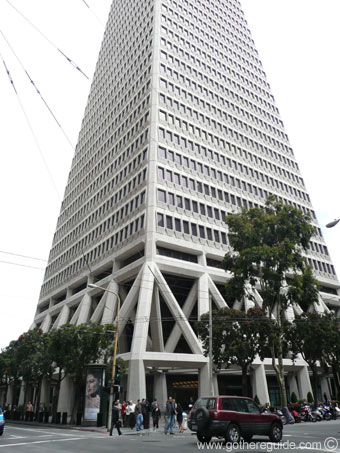
There may be a case for some security on particular high profile buildings like the Empire State Building or the Transamerica Pyramid, but stopping people from taking photographs of these buildings is in no way going to stop a terrorist attach on the building. 


As we all know, everything is available on the web. You want a picture of the Transamerica Pyramid?  Ok, let's go to Google images and get one: 

To find the above photo on Google my search took .26 seconds and returned 122,000 images.  No person or group who is planning any type of terrorist attack on a landmark or building would take the chance being caught near such a place when any photo they would need is available quickly and easily on the web.

The truth of the matter is that no one can stop you from taking a photo of a building or anything for that matter as long as you are taking the photo from an area that is accessible to the public.  Now, there are rules against standing on private property and taking photos.  That is definitely breaking the law and you can be asked to stop taking pictures. 

The impedance for me to write this post was from a story I read about a photographer who was asked to stop taking pictures of the Miami Herald Building which is a landmark building in Miami, FL.  This story can be found here: http://goo.gl/kvC82

I also found an article by Glenn Harlan Reynolds written for Popular Mechanics magazine that contains a lot of relevant information regarding photography do's and don't's. That article can be found here: http://goo.gl/jPjHU

Photography is not a crime and no photographer should be treated as such.


Monday, June 18, 2012

Flash! The dreaded "M" - manual mode

I had the pleasure of attending a workshop presented by the Northern California Professional Photographers (ncpponline.org) on Thursday, June 14th. The subject of the workshop was "Amazing Light - Anytime, Anywhere" with Scott Robert Lim (www.scottrobertgallery.com). 

Mr. Lim gave a really informative presentation on the use of flash in any setting. He covered the "Inverse Square Law" and how it is used to calculate light fall-off and why, when you move a light source closer to a subject, the light is softer. Since I've been studying photography and lighting for some time now, I am familiar with this concept, but when you have the opportunity to see someone do a live demonstration your understanding becomes much deeper.

Mr. Lim is a proponent of using reflective and white umbrellas for any shoot needing a diffused flash and the importance of learning to use your flash in manual mode. As Mr. Lim explained, if a shot using flash is blown out and you are using the flash in the "auto" mode then no matter what adjustments you make to the camera's ISO, shutter speed or aperture, the flash will compensate and you will produce the same ill lit image. Having full control over your flash by learning how to use it in manual mode is the only way to produce quality images and to ensure you will be able to see your vision to it's fruition.

I recently had an experience that supports what Mr. Lim preaches. I am in the process of learning how to take studio portraits. I was using my 580EXII Speedlight in the TTL mode to light my subject and I was not happy with the results. I moved the Speedlight closer, not happy. I moved the Speedlight farther away, not happy. I shot through an umbrella, not happy. I shot into an umbrella, not happy. No matter what I did, the portrait I was trying to take did not have the right exposure. Finally, with no where else to go, I put the flash in the manual mode and opened the instruction book. I learned to changed the power and zoom settings manually. Lo and behold, I finally was able to get an acceptable portrait.

Understanding the manual mode power and zoom controls has really made a difference in my photos.

And then a surprise... My father-in-law is a big proponent of my photography work. He is a pretty good photographer in his own right. Well, he was at a garage sale and found a almost brand-new reflective studio lighting kit for me. The kit had barely been used. We set it up this weekend and it works great! He probably paid $5 for it. The kit is around 30 years old and the workmanship and stability shows it. This kit is solid! Everything is made of metal, no plastic parts here. So thank you Bob for the Fathers Day surprise!

I appreciate any comments below.

Wednesday, June 13, 2012

Stop! Listen! and Learn!

My interest in photography was peaked several years ago. I had started listening to The Tech Guy radio show hosted by Leo Laporte. I soon figured out that Mr. Laporte hosted many other technology shows. I started listening to these shows and often his guests would be photographers, which is what got me interested in photography. In this posting I'll write a short synopsis of some of my early and current photography and technology influences and why you should listen to these people as well!


Scott Bourne (www.scottbourne.com, @scottbourne on Twitter)

Mr. Bourne was a major influence on my decision to make photography a big part of my life. Mr. Bourne is a world famous photographer that takes some of the world's best photographs of animals, particularly birds, in their natural habitat.
Mr. Bourne has a podcast called Photofocus. When I started listening to the podcast, the format of the show was Q&A. Photographers (amateur, semi-pro and pro) would email in questions that Mr. Bourne and "Canon Explorer of Light" Rick Sammon would try their best to answer. You learn a lot listening to the answers. You would be surprised how many people out there have the same exact questions that you have!
The format of the podcast has changed I'm sad to say.  The show is now hosted by Richard Harrington and Mr. Bourne is a co-host once in a while. They do very few Q&A sessions now.  The show is still good, but it was better with the old format.
The best part of the old Q&A format was the guest co-hosts.  Mr. Bourne would have guest co-hosts every week.  The list consisted of such great photographers as Tamara Lackey, Bambi Cantrell and Kevin Kubota.  What made this part special was that each guest host would have a different answer or point of view on a particular subject than Mr. Bourne did.  This way you got both sides of the "story".  Having two answers to the same question allows you to take all the information in and make your own decision. 
Mr. Bourne is still active on many podcasts and his blog. I recommend following Mr. Bourne on Twitter and to visit his site regularly for great information on photography and to view some of his great images.  He has coined one of my favorite photography sayings: "Don't just take pictures, make pictures."

Rick Sammon (www.ricksammon.info, @ricksammon on Twitter)

I was first introduced to Mr. Sammon while listening to the Photofocus podcast referred to in the above paragraph. Mr. Sammon offered a lot of good advice on how to "see the light" when taking pictures. I found out a little later that Mr. Sammon is a Canon "Explorer of Light".  The "Explorer of Light" designation from Canon means that Mr. Sammon was chosen to join an elite group of 60 photographers and cinematographers who were selected to share their knowledge and expertise. Mr. Sammon is often referred to as one of the "Godfathers" of photography.  
Mr. Sammon, along with Juan Pons, host the Digital Photo Experience (DPE) podcast.  Mr. Sammon and Mr. Pons talk about the latest gear, software and news in the photography world.  They usually have a very insightful interview with a photography industry leader. The last part of the show is always spent on answering photography questions sent in by show listeners.
Listening to Mr. Sammon's advice will surely make you a better photographer. 

Leo Laporte (www.twit.tv, leoville.com, @leolaporte on Twitter)

Leo Laporte is not a photographer, but he is a tech guru and worth listening to just to get the latest tips, tricks and news in cutting edge technology. Mr. Laporte has a long pedigree in the technology industry. He hosted one of the first technology help shows, TechTV.  
I originally got "hooked" on Mr. Laporte while listening to his "Tech Guy" radio show. This is a syndicated radio show where people with computer problems call in and ask Mr. Laporte how to fix them. It is fascinating to hear people call in and ask for help with some of the same problems I was having. Without Mr. Laporte's help I would have never had the guts to upgrade the ram on my PC years ago.  
Mr. Laporte also runs the TWIT network which is a growing collection of daily and weekly shows on various subjects; technology, law, humor, just to name a few. The technology show that he hosts (This Week in Tech or TWIT) is a panel show with several guests. Mr. Laporte and his guests discuss the technology news of the week. Often times, these guests can be photographers, so it's always interesting to hear their take on the technology news of the week. Mr. Laporte, along with photographer Catherine Hall (www.catherinehall.net), host a weekly photography show called "TWIT Photo". I highly recommend any photographer at any skill level listen to this show. The show is always very helpful and informative. There is the added bomus of watching the show as well because Mr. Laporte streams his shows live. Watching the show is helpful when Ms. Hall does a photography demo. 
I highly recommend watching live or listening to any of the TWIT Network shows to become a more informed photographer and techie. 


Rosh Sillars (www.roshsillars.com)

Mr. Sillars is a recent addition to my podcast listening habit. I heard Mr. Sillars when he was a guest on the Photofocus podcast. Mr. Sillars is a veteran photographer who specializes in photojournalism of people, food and interiors. 

Mr. Sillars is now more of a social media maven, offering great free help on getting vistors to your blog or photo site.  He posts new podcasts and updates his blog quite often, sometimes several times in one week. His help is invaluable. If you care about building your brand, getting visitors to your site and more business, photography or otherwise, you would be wise to subscribe to Mr. Sillars podcast found under Detroit Creative Labs in iTunes.


Frederick Van Johnson (frederickvan.com, mediabytes.com, @frederickvan on twitter)

Mr. Van Johnson is a professional photographer and social media expert.  His photography business and knack for marketing has led him to start a marketing company for creative professionals called MediaBytes.

Mr. Van Johnson also hosts "This Week in Photography" or "TWIP", not to be confused with Mr. Laporte's "TWIT Photo" podcast. The podcast is always hosted by Mr. Van Johnson and several fellow photographers. They discuss the news of the day, play a pre-taped interview with a famous photographer and then do a Q&A session answering questions sent in by listeners of the show.

Mr. Van Johnson has an excellent personality for hosting the show.  He's very easy going and makes sure each co-host on the show is allowed to give their own opinion on the particular news story they are reviewing.  Of course they also review any new release of photography software or the latest camera that's been introduced on the market.

I recommend listening to the TWIP podcast to stay current on the latest news and current trends in photography.

These are, in my opinion some of the most important people and trend setters in the photography, technology and social media business. They not only have great shows but they are all great teachers who love sharing their knowledge with all of us.

Tuesday, June 5, 2012

What is a photograph?

I've been thinking about what to write for my next blog posting. I've stopped and started on several different topics. Needless to say, I was having a hard time.  Then I came across the photos of Adam Schallau. 

Adam Schallau is a photographer who is "inspired by the landscape, culture, and people of the American West". I just happened to run across his website while on the Photoshelter website. They had his website up as a example of the websites that they can offer to a photographer and I just happened to click on it.

His photographs are truly inspiring. The pictures on his site made me stop and think, "What is a photograph?"

To me, a photograph should be a image that makes you feel something. It should bring out an emotional response in the viewer.  Does looking at the picture make you sad? happy? relaxed? Does it inspire you to work harder on your own photography skills in order to push yourself to do better work? 

When I came across Adam's work I was amazed at the feelings that it brought out of me.  The huge landscapes, the beautiful colors and the shear grandness of the pictures.  Knowing there are places in America that are still untouched by human hands. My feelings were all over the place.

That's when I decided what a photograph is to me. 

View Adam's work at: http://adamschallau.com/adam-schallau/

Friday, June 1, 2012

New App Review: FreezePaint!


  • App Name: FreezePaint www.freezepaintapp.com
  • Developer: Ron Brinkmann
  • System and gear requirements: Any iPhone or iPod touch with a camera running iOS 4.2 or newer. Designed for iPhone, compatible with iPad.
  • Cost: Introductory .99¢, then $2.99
Being a budding photographer, I am always listening to and watching podcasts on the subject. One of my favorite shows is "This Week in Photo" or TWIP. TWIP is hosted by Frederick Van Johnson. The show is always interesting and informative. Along with Frederick, there are a few recurring guests on the show, including Ron Brinkmann. At the end of the show, each guest shares a "pick of the week" with the listeners.

At the end of one of the recent shows, Mr. Brinkmann shared that he had been working on a new iOS app that was recently released called FreezePaint. FreezePaint promises a new kind of photography and it delivers!

When you first open the app, the initial screen welcomes you to FreezePaint and gives brief instruction on how to use the app and save/share pictures. Each button along the bottom edge of screen in labeled. 

The initial screen is closed with a tap to the screen. The i-device camera is now active and you are ready to start using the app. The Welcome screen can easily be brought back up by tapping the question mark in the bottom row of icons.

There are two ways to use the app. The first is to frame the picture you wish to manipulate and tap the Freeze or Clear All button and choose Freeze All. The next step is to use your finger and "erase" a portion of the picture you wish to replace with another image. The best way to describe what happens is that a little "window" appears in your current image where you have just erased. Using the i-device camera, find your next image by looking through the little window and then choose Freeze again by tapping on the Freeze button and choosing Freeze All.  In the example below I took a picture of my Airedale calendar (Yes, I have an Airedale Terrier named Rocky and I think he's the greatest), erased the head of one of the Airedales in the photo and replaced it with Rocky's photo.
Rocky is the one on the right
In the next example, I froze an image of an old Coca-Cola mirror, erased Coca-Cola and replaced it with another product, Swiffer. 


The other way to use FreezePaint is basically the opposite of the above manner.  Frame the image you want to use and draw on the portion you want to save.  Once you draw on the portion you want to save, lift your finger and the app saves that portion of the image.  Then frame the portion you just saved over another subject and tap the Freeze or Clear All button and choose Freeze All.  You now have a new image.

You can erase or save portions of images multiple times for the same image. I believe you are only limited by the size of the i-device screen. I was able to copy 40 different portions of an image and then stopped.

I know what you're thinking, "What can I do with these cool new images I'm making?" Well, if you are not happy with the image, tap the Freeze or Clear All button and choose, you guessed it, Clear All. To save an image to your i-device camera roll, tap the save/share icon. The app automatically saves the image.  

All of the "required" social features are built into the app. Once you've saved a image to the camera roll, you can tap the save/share icon to share the image on Twitter, Facebook, Flickr or email.  

The last icon is the configure icon. Tapping on this icon brings up the configure menu to set the flash either Auto, On or Off. You can also change the brush size with a slider in this menu. 

I think there are lot of interesting images that can be made with this app. It's also a lot of fun. I've changed lips and ears of portraits that we have hanging on the walls in our house and it's pretty funny.  But I'm sure there are other uses for the apps that I have yet to explore. You are only limited by your imagination. There are plenty of neat images on the FreezePaint website for you to explore. The app is currently .99¢ in the Apple App Store for a limited time before the price increases to $2.99. I suggest that you get the app before the price increase. It's a lot of fun and will give you hours of enjoyment.  

Wednesday, May 30, 2012

iOS App review: Pocket Light Meter


  • App Name: Pocket Light Meter
  • Developer: NuWaste Studios
  • OS: iOS only, not for Android
  • Gear: Best used on iPhone
  • Cost: Free. In app purchase if you would like to pay .99 or 4.99
Nuwaste Studios has created an app for the iPhone called "Pocket Light Meter".  Since I love new apps I downloaded this immediately and started using it.


The first thing I noticed was how easy it was to use. Open the app and the camera activates. Three dials or wheels are on the bottom half of the screen. One for  "Time" (Shutter speed), one for "Aperture" and one for "ISO".   There is a red square that is used to analyze the object you are photographing.  The red square moves to where ever you tap on the screen.  There is also two icons, a gear icon and a "use the other camera" icon. Along the bottom of the screen are "Save" and "Hold" buttons. 


Point your phone at the scene or object you are going to photograph and the app analyzes the scene and changes the wheels at the bottom of the screen to the proper settings to use on your camera to take a properly exposed photo.  The app is constantly analyzing the photo, adjusting time, aperture and ISO. You can change any of the variables and the app will adjust the other two settings for you. For example in the picture above, I chose an aperture setting of 7.1, the app changed the time and ISO settings in order to give you the right settings for your camera to get the correct exposure for your picture. 


The "SAVE" and "HOLD" buttons give you more choices.  Tapping on the SAVE button takes a photo of the scene you are viewing and saves it to the camera roll.  When you view the photo in camera roll you will see that the app has included the settings and location (if you allow the app to use your location) information. 


Tapping the HOLD button holds the current time, aperture and ISO settings so they won't change.  Tapping HOLD again releases the settings. 

The gear icon takes you to settings and other options in the applications.   Here, you can pay the developer for the app, either 4.99 or .99.  Of course the app is free, so if you find no value in using the app, then keep the free edition. But, if it helps you as it did me, pay the developer something, even if it's just the .99. 


The other settings are:

  • Sound - On or Off
  • Show Additional Data - On or Off.  Turn it on and the main screen shows exposure valuation, Lux and FootCandle which are approximations of luminance.  Quite frankly I don't know the meaning or have a use for these measurements.
  • User interface - either keep the new update interface or switch to the old version.  To me, the old version is clunky and difficult to use, so stick with the current wheel version. 
  • Exposure correction - adjust it up or down a third of a stop at a time.
  • Shutter stops, aperture stops, ISO stops - these are basically the same settings for each, either full, halves or thirds. 
  • Cinematic speeds - On or Off.  Adds shutter speeds for shooting video.
  • Dropbox settings - You can link your Dropbox to the application so the photos you shoot on the app can be uploaded to the folder of your choice in your Dropbox.  I love this feature!
My overall impression of the app is that it works pretty good in sunlight.  I took some test photos using the settings the app gave me for different light conditions and the app performed well.  I took this picture of a small statue using the app settings:


The image came out good.  I'm happy with the results.  This photo was taken in bright sunlight. 


Overall I'm happy with the app.  Using it is easy and very intuitive.  This is a must have app for those photographers who are just starting out and have never used a light meter before. Not only is it a good app, it's a good training tool as well.